Building Kanban Studio: an AI assistant that proposes, not decides
Building Kanban Studio using Claude Code - A small project board with an AI assistant, built around one rule: the model proposes changes, and the backend decides.
· AI, Architecture, Docker
After building this website, I wanted a second project with a very different shape: a small application with a real backend, a database and an AI feature that changes data rather than just answering questions. Kanban Studio is the result: a project board with an AI assistant that can create, edit and move cards when you ask it to.
It was built from a course brief by Ed Donner, using AI coding agents in VS Code. As with this site, I did not write the code myself. I set the constraints, reviewed what the agents produced, made the trade-offs and checked the results. This post explains what the app does, how it is put together, and, just as importantly, what it would take to make it fit for real users.
What the app does
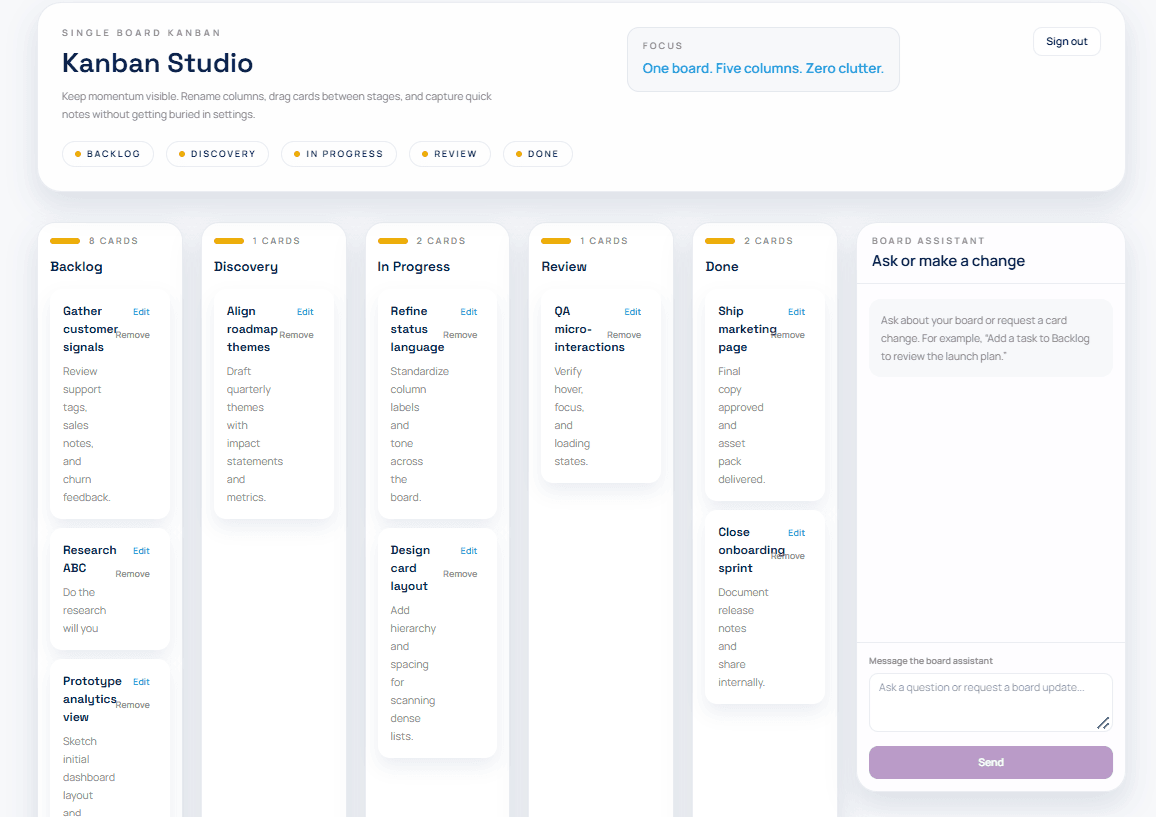
You sign in and see a board with five columns: Backlog, Discovery, In Progress, Review and Done. You can rename columns, add, edit and delete cards, and drag cards between columns.
The interesting part is the sidebar. You can ask the assistant questions about the board ("what is still in review?") or ask it to change things ("move the analytics card to Review"), and the board updates in front of you without a reload.
The one design rule that matters
The most important decision in the whole app is simple to state: the AI never touches the database directly.
When you ask the assistant to change something, the backend sends the model three things: instructions, the current board as data, and your conversation. The model must reply in a fixed shape, known as structured output: a text answer plus a list of proposed actions, such as "create this card" or "move that card to Review".
The backend then checks every proposed action. Does the card exist? Does the column exist? Does it belong to this board? If any single action fails the check, none of them are applied, and you see an error. The board is never left half-changed.
In other words, the AI proposes and the backend decides. That is how I think AI should be built into real systems: treat the model's output as untrusted input, however capable the model is, and keep the authority to change data in ordinary, testable code.
The architecture
Everything runs as one program on one address, packaged in a Docker container. The browser loads a static frontend, which talks to a Python backend. The backend owns the database and is the only part that talks to the AI model.
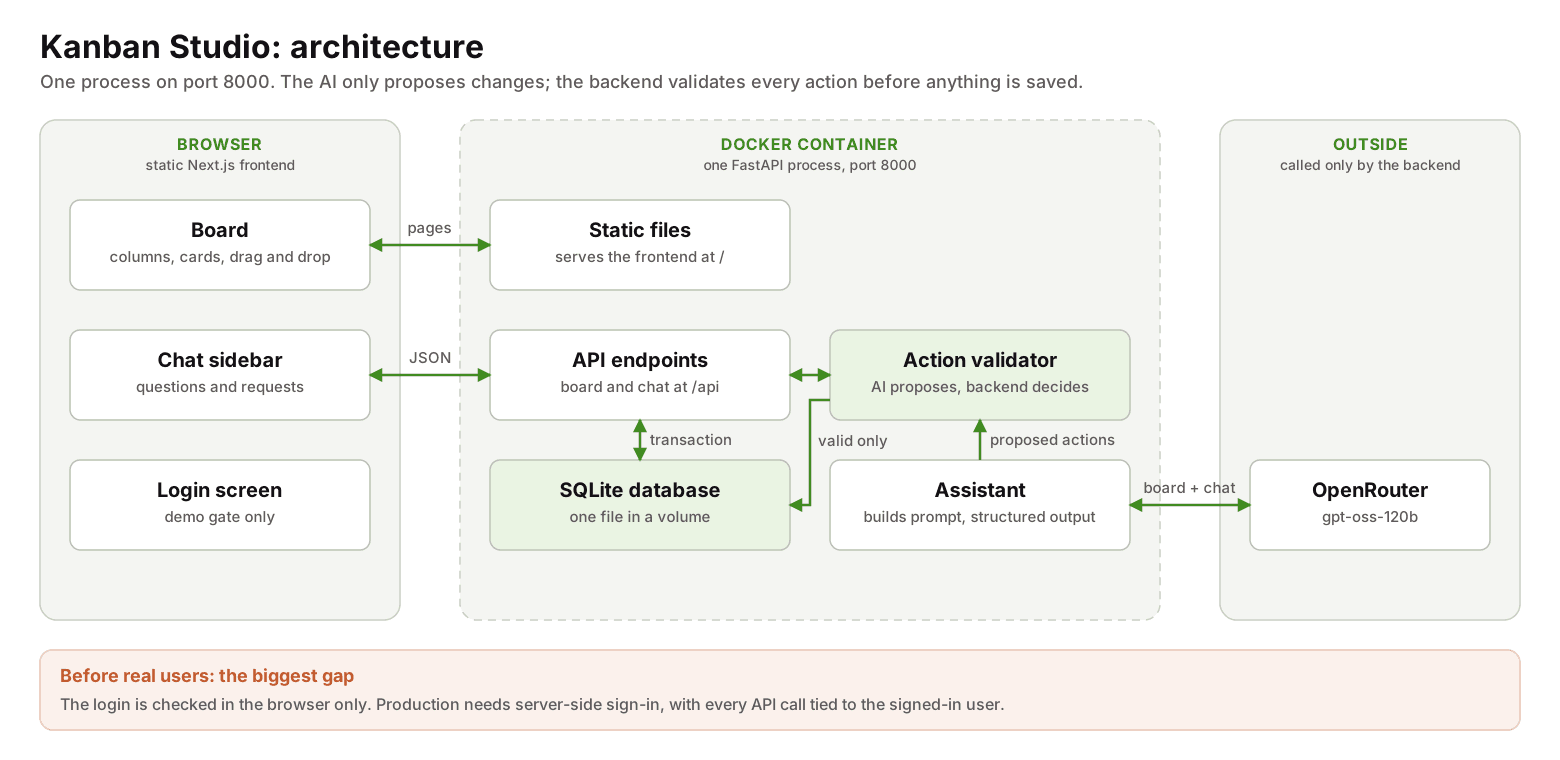
Following a single drag of a card shows how the parts work together:
- The card moves on screen straight away, so it feels instant.
- The frontend sends a small request to the backend with the card's new column and position.
- The backend checks the request is valid.
- It saves the change in a single transaction: all of the changes are saved together, or none are.
- It sends back the whole updated board, and the frontend shows it.
- If anything fails, the card snaps back to where it was and an error appears.
Why these technologies
Some choices were set by the course brief. Each is a reasonable fit for an app of this size:
| Area | Choice | Why it fits |
|---|---|---|
| Frontend | Next.js and React, exported as static files | A widely used way to build interactive screens; exporting static files means no separate frontend server |
| Drag and drop | dnd-kit | A modern, maintained library for React |
| Backend | FastAPI (Python) | Short, readable code, automatic checking of incoming data, and free interactive API documentation |
| Data checking | Pydantic | Describes the shape of data once and checks it everywhere, including the AI's replies |
| Database | SQLite | A full SQL database in a single file, with nothing extra to install or run |
| AI | OpenRouter with gpt-oss-120b | One gateway to many models, so the model can be swapped by changing one setting |
| Packaging | Docker | The whole app and everything it needs, in one box that runs the same anywhere |
| Tests | unittest, Vitest and Playwright | The standard tool for each layer: backend, frontend components and a real browser |
Two smaller decisions are worth calling out.
One address for everything. The backend serves both the frontend files and the API from the same address. Because the browser only ever sees one website, there is no cross-origin configuration to get wrong.
A properly structured database. The board could have been stored as one big block of data. Instead, users, boards, columns and cards each have their own table. That lets the database itself enforce the rules: a card must belong to a real column, two cards cannot claim the same position, and deleting a board removes its columns and cards. Moving one card changes a few rows rather than rewriting the whole board.
Docker, in plain terms
This was my first project packaged with Docker, and it is worth explaining because it is so widely used.
- An image is a packaged, read-only snapshot of the app and everything it needs. Think of it as an installer that never changes.
- A container is a running copy of that image. Containers are disposable; the image stays the same.
- A volume is storage that lives outside the container. The database file sits in a volume, so it survives when the container is rebuilt or replaced.
The recipe for the image is built in two stages. The first stage builds the frontend, which needs Node.js and hundreds of megabytes of build tools. The second stage starts afresh from a small Python image and copies in only the finished frontend files. The build tools are thrown away, so the final image is roughly 300 MB instead of well over a gigabyte.
The order of steps matters too. Docker reuses any step whose inputs have not changed, so the recipe installs dependencies before copying the source code. Editing a single file then rebuilds in seconds rather than reinstalling everything. The rule of thumb is to put the steps that change least often first.
Finally, the OpenRouter key is never baked into the image. It is passed in when the container starts, so the image could be shared without leaking the key.
One practical lesson: Docker Desktop on my Windows machine initially refused to start, reporting that virtualisation was not available. The cause was a Windows setting that had switched the hypervisor off, and a single command as administrator, followed by a restart, fixed it. Environment problems like this are a normal part of any build, and worth budgeting for.
How it is tested
The tests are layered from fast and narrow to slow and realistic:
- Backend tests check the endpoints, the database rules and the AI handling, using a temporary database and a fake AI. One example: an invalid AI action must change nothing.
- Component tests check that each piece of the screen behaves correctly against a fake backend.
- Browser tests drive a real browser that clicks and drags through the app, for example checking that a failed drag puts the card back.
The automated tests never call the real AI. Its replies vary from run to run and every call costs money, so the tests use canned replies, and the real model's behaviour is checked by hand.
Honest status: a working MVP, not a product
The app works on my machine. I have used the assistant to move cards and seen the board update live. But I would not put it in front of real users yet, and the reasons are the most useful part of the project.
The biggest gap is sign-in. The login screen checks a username and password inside the browser. That is a demo gate, not security. The backend trusts whichever username appears in the request, so anyone who could reach the server could read or change a board without signing in. A real version needs sign-in handled by the server, a session on every request, and every endpoint checking that the signed-in user owns the board.
Beyond that, the gaps fall into familiar groups:
- Security basics: HTTPS, secrets kept in a proper secret store, rate limits on the chat (every message costs money), size limits on text, and a hardened container.
- Data: backups, a safe way to change the database structure over time, and a move to PostgreSQL if it ever needs more than one server or many people editing at once.
- The AI feature: cost tracking, retries and a fallback model when a provider is slow or down, and a small set of example requests rerun whenever the model or prompt changes. Card text is sent to the model, so a card could try to inject instructions. Validated actions limit the damage, but that risk grows if boards are ever shared.
- Operations: monitoring, error tracking, and automated tests on every change.
- Accessibility: dragging currently needs a mouse or touch; keyboard dragging is supported by the library but not yet switched on.
There are also checks I still want to complete before calling the MVP finished: confirming every change survives a container restart, pushing the assistant on awkward requests (an unknown card, several changes at once, "delete everything"), and a few layout fixes.
None of this is unusual. The gap between "it works on my machine" and "people can rely on it" is where most delivery effort actually goes, and naming it clearly is part of the job.
Two projects, two architectures
It is useful to set this app beside how I built this website. The website is a Next.js app on managed hosting, with its content in Markdown files and no database of its own. Kanban Studio is a Python backend with its own database, packaged in a container. Different problems call for different shapes, and neither is "the right way" in general.
What the two share matters more. Both keep secrets on the server. Both treat AI output as something to check rather than trust. Both put the brief, the quality checks and the verification ahead of the code. AI agents made the building fast; the discipline around them is what made the results worth trusting.
What I would tell anyone doing this
- Decide where authority lives before you add AI. Let the model propose, and let ordinary code decide.
- Make changes all-or-nothing. A half-applied change is worse than a refused one.
- Test the AI with canned replies, and check the real model separately and deliberately.
- Learn the basics of your packaging. Images, containers, volumes and step order are worth an hour of anyone's time.
- Write down what is missing. An honest list of production gaps is a sign of a mature build, not a weak one.
Credit where it is due: the brief for this project comes from Ed Donner's course. The build, the review and the lessons are mine.