How I built this website with AI coding agents
An honest account of building and launching alfino.ai, including its AI assistant, by directing AI coding agents: the decisions, dead ends and lessons
· AI, delivery, architecture
I am not a front-end developer. Over about a week, I built and launched this website, including an AI assistant that answers questions about my work, by directing AI coding agents rather than writing the code myself. My role was the one I play on any delivery: setting the brief, making decisions, reviewing output and verifying that what was delivered actually works.
This is an honest account of how it went: the decisions, the dead ends, and what I would tell anyone attempting the same.
Start with the brief, not the build
Before any code was written, I wrote the rules. A single file, AGENTS.md, sits at the root of the project, and every AI agent reads it before every task. It sets out:
- Accuracy rules. Every figure belongs to a specific engagement and may not be merged, rounded up or moved. Contributions may not be inflated into leadership. Where content is missing, the agent leaves a visible placeholder instead of inventing something plausible.
- Privacy rules. No home address, phone number, family details or anything similar, anywhere in the build.
- Design rules, including a list of things that make a site look machine-generated: gradient washes, identical rounded cards, emoji as icons, stock photography.
Alongside it sits a profile document, the canonical source for every fact about me. If anything conflicts with it, the profile wins.
This turned out to be the most valuable hour of the whole project. AI agents are fast and capable, and they will confidently fill any gap you leave. A clear brief is the difference between directing them and supervising them.
Diverge early, then decide
I asked the agent to build three visually distinct home pages, so I could choose between real options rather than imagine them. The first round followed my brief faithfully and produced something I disliked: huge type over hairline tables, austere enough to look like a standards body's website. The problem was my brief, not the execution. I had banned almost everything that makes a site feel human.
So I rewrote the design section to describe what the site should feel like (warm, confident, a person rather than an institution) while keeping the list of things to avoid. A dark design with a single green accent came out of the second round. The logo went through several iterations before settling, and I separated that decision from the build so it never held anything up.
Lesson: build options cheaply, judge them with your eyes, and treat a disappointing result as feedback on the brief.
One source of truth for content
Every word on this site lives in plain Markdown files, separate from the design and code. That one decision shapes almost everything else:
- I can edit the site myself. Changing a sentence means editing a text file, not asking an agent.
- Mistakes are caught before they go live. The content is checked against defined rules, so a missing field stops the build with a plain-English message naming the file.
- The website and the assistant can never disagree, because both read from the same files.
Later upgrades extended the idea: pages are built from reusable blocks I can add and reorder, new pages can be created by adding a file, and pictures can be placed anywhere. Location and camera data is stripped from every image automatically before the site is built.
The assistant: grounded, honest and cheap
The Ask page is an AI guide to the site's content. The design constraint that mattered most was simple: it must never invent facts about me. It answers only from the published content, and when it doesn't know something, it says so and suggests asking me directly.
A few decisions behind it:
- The model. It uses an open-weight model, gpt-oss-120b, through OpenRouter, a gateway to many models. That keeps the model easy to change. Each question costs a fraction of a penny: my first eighteen test questions cost about a third of a cent in total.
- Abuse protection. Each visitor is limited to twelve questions per fifteen minutes, with the counts kept in a small shared database (Upstash Redis), so the limit holds however many copies of the site are running. A monthly spending cap at OpenRouter is the backstop.
- Privacy. No conversations are stored, and the site sets no cookies.
- Testing. I tried to catch it out with leading questions designed to make it repeat errors or inflate claims. It corrected them.
One lesson from testing: I switched on an extra safety filter at OpenRouter that screens for sensitive information. It promptly hid my own contact email from answers. Every safeguard needs testing against the real use case, not just switching on.
Quality gates
The build refuses to ship if certain conditions are not met:
- Any unresolved placeholder remains.
- Any text or link colour fails accessibility contrast standards.
- Any content file is missing a required field, or any image is missing its description for screen readers.
These gates meant I could make changes quickly without worrying about quietly publishing something broken. If a check fails, the previous version simply stays live.
The hosting detour
Hosting was where the plan met other people's rules. I had planned to use GoDaddy's new Node.js hosting, since my domains were already there. The site built successfully but failed in their free preview, which ran it in development mode, and publishing required a paid plan.
I weighed the alternatives: AWS (Amplify, Lightsail or App Runner), Netlify, Render and Vercel. I chose Vercel: it is made by the team behind Next.js, the site deployed successfully on the first attempt, and every push to GitHub now updates the live site automatically. The domain stays registered at GoDaddy, with its DNS pointing to Vercel. Email forwarding for my site address runs through ImprovMX, which keeps my personal address out of public records.
Because the architecture was kept simple and portable, changing host took an afternoon rather than a rebuild. Moving the rate-limit counts into a shared store was the only code change needed.
The architecture
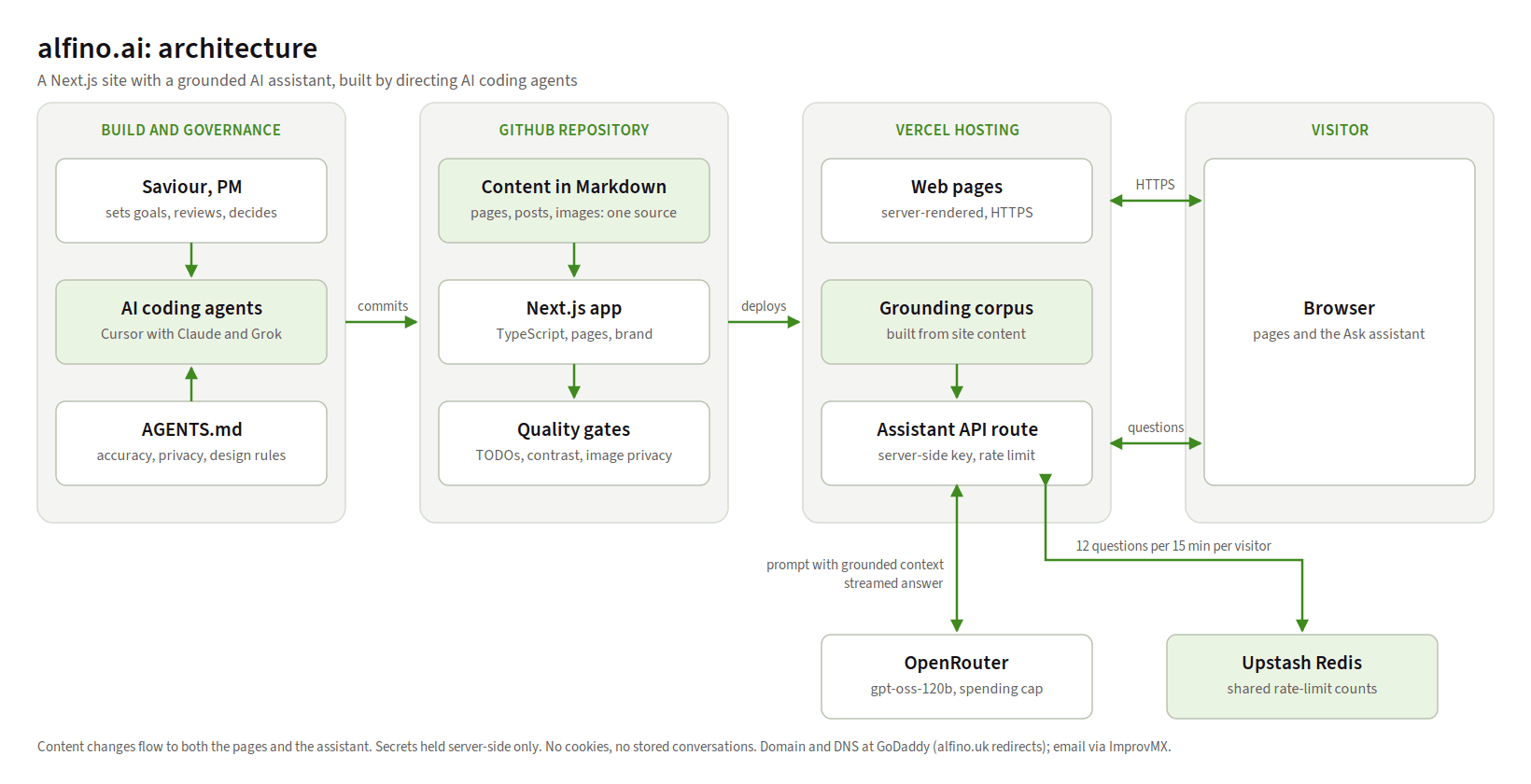
The first diagram shows how the site is built and deployed, left to right: my decisions and the agents' rules, the code and content in GitHub, the hosting on Vercel, and the services the assistant uses.
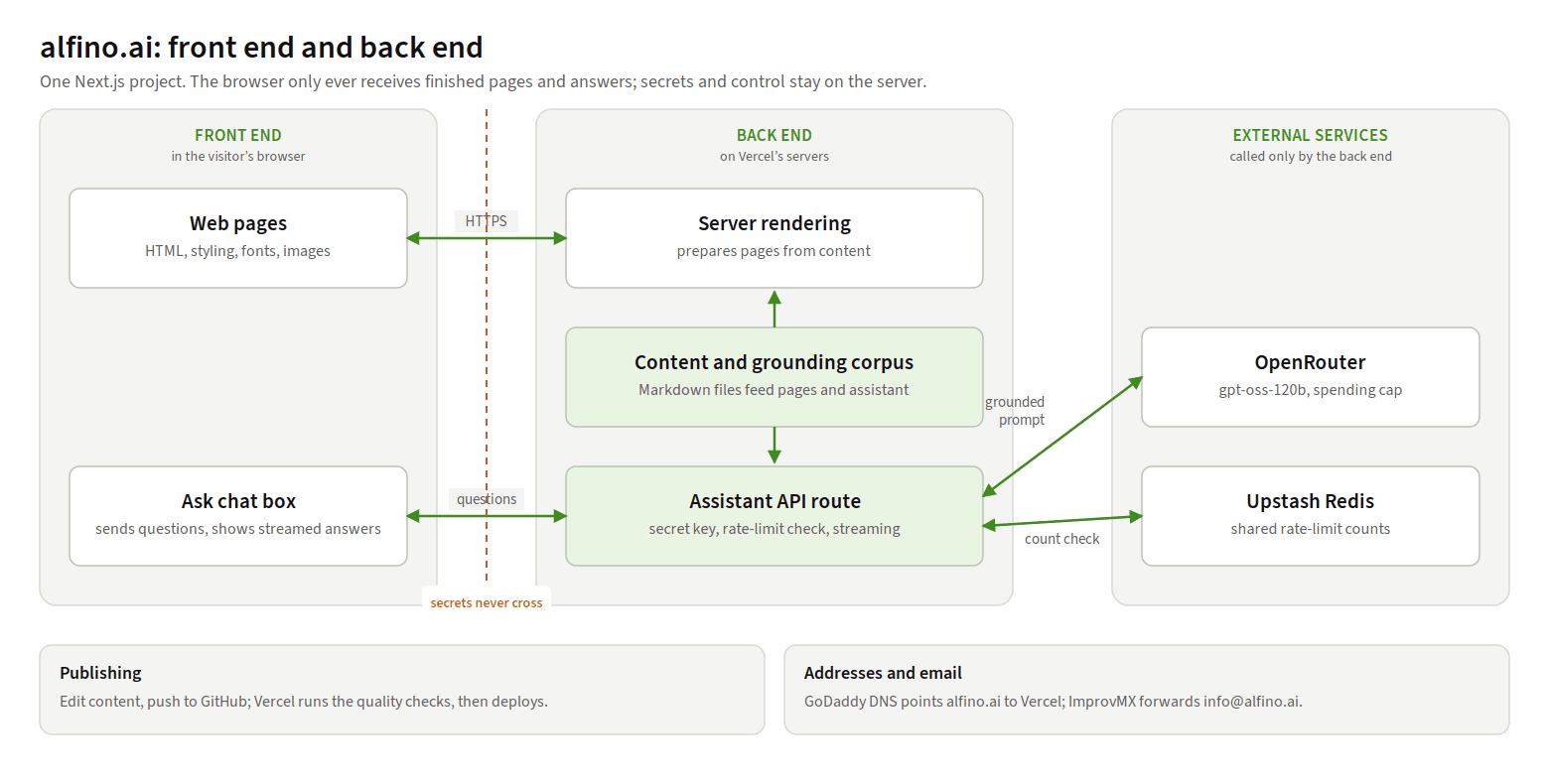
The second shows what runs where. The browser only ever receives finished pages and answers. Everything secret, such as API keys, stays on the server.
The technology, in brief
| Technology or service | What it does | Why I chose it |
|---|---|---|
| Next.js and React | Framework and components, front end and back end in one project | Fast pages, server-side code for the assistant, room to grow |
| TypeScript | JavaScript with built-in checks | Catches mistakes before they go live; helps agents edit safely |
| Tailwind CSS | Styling | Consistent design from a small set of rules |
| Markdown and MDX | The content format | Plain text I can edit myself |
| GitHub | Code and full version history | Backup, and the trigger for every deployment |
| Vercel | Hosting and automatic deployments | Native Next.js support; worked first time |
| OpenRouter, gpt-oss-120b | The assistant's model | Flexible, inexpensive, with a spending cap |
| Upstash Redis | Shared rate-limit counts | Reliable limits across many server instances |
| GoDaddy and ImprovMX | Domains, DNS and email forwarding | Domains already there; private, free forwarding |
| Cursor, Claude and Grok | The AI coding agents and their editor | Build tools only, not part of the running site |
Why no Docker? Containers earn their place when you manage your own servers or run many services together. Vercel builds and runs Next.js natively, so a container would add a layer with no benefit. If I ever move to self-managed hosting on AWS, the site would be containerised as part of that move.
What it cost
- Cursor Pro, the AI coding environment: a monthly subscription. Its allowance for the most capable model ran out after the two biggest build runs, which taught me to save the expensive model for work needing judgement, and use faster, cheaper models for routine edits.
- Hosting, rate limiting and email forwarding: free plans.
- The assistant: fractions of a penny per question, capped monthly.
- Domains: annual renewals.
What I would tell anyone doing this
- Write the rules before the first prompt. Accuracy, privacy and design constraints save more time than any clever prompt.
- Ask for options, then decide. It is cheaper to choose between three real designs than to fix one imagined one.
- Keep content separate from code, so you can own your words without help.
- Build quality gates in early, so speed doesn't come at the cost of quiet mistakes.
- Test every safeguard against real use, including the ones meant to protect you.
- Keep the architecture simple and portable. Hosting is where plans meet reality.
- Stay in the reviewer's seat. The agents wrote the code; the decisions, trade-offs and verification were still mine.
Directing AI agents did not remove the need for delivery discipline. It made it more important. The agents moved fast; the brief, the gates and the testing kept that speed pointed in the right direction. That is also the core idea behind the delivery approach I use for AI systems.